Changes Since VIA Version 3
Introduction
The original VIA Version 3 release introduced externally defined custom menus and VIA protocol 11. VIA has continued to extend that model without requiring a new keyboard-definition version.
This page summarizes the important definition, firmware, and application changes added since the original V3 release. The linked specification pages remain the authoritative reference for each feature.
Most changes are opt-in. Existing V3 definitions continue to work unless they use an older compatibility option that now has a more precise replacement.
How to use this guide
- For a quick review, start with Before and after.
- If you are writing a definition, read Firmware, menus, and keycodes, Requirements and compatibility, and Keyboard definition changes.
- If you are writing firmware, continue with Firmware integration changes and Post-V3 Practical Examples.
- Before submitting, check Fallbacks and validation failures and the Migration and validation checklist.
Before and after
| Area | Earlier V3 behavior | Current behavior | Recommended update |
|---|---|---|---|
| Firmware revisions | A materially different firmware often required a duplicated definition or another VID/PID. | VIA_FIRMWARE_VERSION is available to showIf as id_firmware_version. | Keep compatible revisions in one definition and condition only the controls that differ. |
| Informational values | Custom menus contained interactive controls only. | Static and firmware-backed read-only labels can display text. | Use a label control for status, version, or other informational text. |
| Related numeric values | Firmware had to correct invalid pairs after VIA sent them. | Range controls can enforce relationships and either clamp or push the related value. | Describe the relationship with constraints in the definition. |
| Custom-value addressing | Commands normally used a value ID and channel ID, with array indexing as a special case. | Numeric arguments can follow the command tuple and are preserved on reads and writes. | Use arguments for layers, slots, indexes, or other firmware-defined addressing. |
| Keyboard name | One definition had one fixed display name. | Firmware can return an index selecting a name from the definition's options. | Use a dynamic name only for compatible variants sharing the same definition. |
| Lighting keycodes | qmk_lighting exposed the legacy combined QMK lighting group. | Definitions can identify Backlight, RGBLight, and RGB Matrix precisely; protocol 13 uses distinct UG_* and RM_* ranges. | Select explicit lighting keycode modules as shown in the case tables. |
| UI refresh | VIA refreshed custom values only as part of app-driven reads and writes. | Firmware can request a full or targeted refresh after an external change. | Send a UI synchronization report when firmware changes a displayed value independently. |
| QMK keycode dictionary | VIA used the legacy unified QMK keycode map. | Protocol 13 firmware reports its QMK keycode version, and VIA selects a dictionary per device. | Use current QMK protocol support; no definition field is required. |
| VIA keymap location | VIA keymaps lived in, or were submitted to, qmk/qmk_firmware. | Official VIA keymaps live in VIA's external QMK userspace. | Submit hardware support upstream, the VIA keymap to VIA userspace, and the definition to VIA Keyboards. |
| QMK hardware configuration | Many keyboard options were commonly placed in config.h or keyboard-level rules.mk. | Supported hardware properties are data-driven through info.json. | Move supported USB, matrix, layout, encoder, Bootmagic, layer-count, and build properties to info.json. |
| Debug output | QMK console output required a separate console client. | VIA includes an optional HID Console tab. | Enable CONSOLE_ENABLE = yes when VIA should display QMK console output. |
| Range presentation | Range controls used one fixed presentation. | Users can choose a slider, slider with value, or slider with numeric input. | No definition change is needed. |
Firmware, menus, and keycodes are separate layers
Lighting is the most common place where these layers are confused, but the distinction applies to other features too:
| Layer | What it does | Example |
|---|---|---|
| QMK firmware configuration | Compiles and enables the feature on the keyboard. | Enable RGB Matrix in QMK's data-driven configuration. |
VIA menus | Adds controls that read and write the feature's live settings. | "menus": ["qmk_rgb_matrix"] adds brightness, effect, speed, and color controls. |
VIA keycodes | Adds keycodes that users can assign to the keymap. | "keycodes": ["qmk_rgb_matrix_keycodes"] exposes protocol-appropriate RGB Matrix keycodes. |
A menu does not enable firmware support or automatically expose assignable keycodes. A keycode module does not add a settings menu or implement the underlying QMK feature. Keep all three layers aligned with the subsystem actually compiled into the keyboard.
Requirements and compatibility
The current VIA web app ships with its matching definition validation support. Keyboard authors do not install or select a separate validation component.
| Feature | Definition requirement | Firmware or protocol requirement | Missing-support behavior |
|---|---|---|---|
Firmware-version showIf | A V3 definition using id_firmware_version in the expression. | Define VIA_FIRMWARE_VERSION; QMK must answer the firmware-version keyboard value. | Without a reported value, VIA cannot reliably enable version-gated branches. |
| Display label | A label control with static or command-backed content. | No firmware work for static text; a custom-value get handler for dynamic UTF-8 text. | A failed dynamic read produces no useful text; static labels remain definition-only. |
| Range constraints | A range with valid constraints and references. | No special protocol requirement; firmware should still validate received values. | Without a constraint, each range remains independently editable. |
| Extended command arguments | Extra numeric arguments after value_id in a custom content tuple. | The custom set/get handler must preserve and interpret the added bytes. | A handler that assumes the value immediately follows value_id reads or writes the wrong byte. |
| Dynamic keyboard name | A name object containing options and a custom command tuple. | A custom-value get handler returning a zero-based option index. | VIA falls back to the first name when the read fails or the index is invalid. |
| Explicit lighting keycode modules | The module or module combination matching the firmware subsystem. | Protocol 13 for distinct UG_* and RM_* keycodes; older protocols use legacy RGB_*. | qmk_lighting remains available as a compatibility fallback. |
| Board-initiated UI synchronization | Active custom controls matching the requested targets. | Firmware sends a version 0x01 UI_SYNC_REQUEST over Raw HID. | Unsupported requests are ignored; values update on their next normal read. |
| HID Console | No definition property is required. | CONSOLE_ENABLE = yes and the standard QMK console HID interface. | The HID Console tab has no output when the console interface is absent or not authorized. |
| Slider and language options | No definition change is required. | None. | These are app preferences. |
Copy-paste JSON and QMK examples are collected in Post-V3 Practical Examples.
Keyboard definition changes
One definition can support multiple firmware revisions
VIA reads the keyboard's VIA_FIRMWARE_VERSION and exposes it to custom-menu expressions as id_firmware_version:
"showIf": "{id_firmware_version} >= 5"
Conditions can cover individual items, groups, submenus, or top-level menus. Firmware-only branches that evaluate false are excluded before VIA reads their commands, so mutually exclusive firmware branches can safely describe reorganized IDs.
This replaces the older practice of assigning another VID/PID and duplicating a definition whenever a new firmware adds custom features. See Firmware-version conditions.
Static and keyboard-provided display labels
The read-only label control has two distinct forms.
A static label displays text stored directly in the definition. Its content contains only that text, and VIA does not contact the keyboard:
{
  "label": "Information",
  "type": "label",
  "content": ["This setting applies to every layer."]
}
A keyboard-provided label displays dynamic text returned by firmware. Its content is a custom-value command tuple containing a unique key, channel ID, and value ID:
{
  "label": "Board status",
  "type": "label",
  "content": ["id_board_status", 0, 2]
}
VIA reads the second form from the keyboard, which returns null-terminated UTF-8 bytes. Both forms are display-only and never send set or save commands. See Display Label.

Relationships between ranges
Range controls can enforce <, <=, >, or >= relationships with another range, including an integer offset. Violations can clamp the edited value or push the referenced control.
"constraints": [
  {
    "operator": ">=",
    "reference": "id_release",
    "offset": 5,
    "onViolation": "push"
  }
]
Definition validation checks references and impossible relationships before the definition is accepted. See Relational constraints.
Extended custom-value commands
Custom controls may include firmware-defined numeric arguments after their channel and value IDs:
"content": ["id_threshold_layer_4", 0, 2, 4]
VIA preserves every argument when reading and writing the value. This generalizes the existing array-value mechanism to layers, indexes, and other addressing schemes. See Array Values.
Dynamic keyboard names
A V3 definition can select its displayed name using a custom value returned by the keyboard:
"name": {
  "options": ["Board", "Board Pro", "Board Special Edition"],
  "content": ["id_board_variant", 0, 3]
}
This is useful when compatible hardware variants share a VID, PID, matrix, and definition. The numeric value ID 3 is only an example from a keyboard-defined custom enum; it is not reserved or required. Unsupported or invalid responses fall back to the first option. See Name.
Protocol-aware lighting keycodes
The original qmk_lighting module exposed the unified legacy RGB_* keycodes. Current definitions can identify the exact subsystem:
qmk_backlight_keycodesqmk_rgblight_keycodesqmk_rgb_matrix_keycodesqmk_backlight_rgblight_keycodes
VIA protocol 12 and earlier continue to use legacy lighting keycodes. Protocol 13 uses QMK's separate UG_* RGBLight and RM_* RGB Matrix keycodes. qmk_lighting remains a compatibility fallback but cannot be combined with an explicit lighting module. See Keycodes.
Lighting keycode cases
For a new or updated definition, select modules from the firmware features that actually accept the assigned keycodes. The built-in lighting menu controls live settings; the keycode modules below control which keycodes VIA allows users to assign. They should describe the same subsystems, but one does not enable the other.
| Firmware lighting subsystems | Recommended keycodes value | Protocol 12 and earlier | Protocol 13 |
|---|---|---|---|
| Backlight only | ["qmk_backlight_keycodes"] | BL_* | BL_* |
| RGBLight only | ["qmk_rgblight_keycodes"] | Legacy RGB_* | UG_* |
| RGB Matrix only | ["qmk_rgb_matrix_keycodes"] | Legacy RGB_* | RM_* |
| Backlight + RGBLight | ["qmk_backlight_rgblight_keycodes"] | BL_* + legacy RGB_* | BL_* + UG_* |
| Backlight + RGB Matrix | ["qmk_backlight_keycodes", "qmk_rgb_matrix_keycodes"] | BL_* + legacy RGB_* | BL_* + RM_* |
| RGBLight + RGB Matrix | ["qmk_rgblight_keycodes", "qmk_rgb_matrix_keycodes"] | One shared legacy RGB_* set | UG_* + RM_* |
| Backlight + RGBLight + RGB Matrix | ["qmk_backlight_rgblight_keycodes", "qmk_rgb_matrix_keycodes"] | BL_* + one shared legacy RGB_* set | BL_* + UG_* + RM_* |
Protocol 12 cannot distinguish RGBLight from RGB Matrix keycodes because both use the same legacy RGB_* range. Listing both explicit RGB modules therefore still produces one deduplicated legacy set on protocol 12, while protocol 13 exposes both distinct sets.
qmk_lighting is retained to keep older definitions working. Its result depends on both the protocol and any standardized built-in lighting menu:
| Compatibility definition case | Protocol 12 and earlier | Protocol 13 | Migration |
|---|---|---|---|
| No QMK lighting keycode module | No lighting keycodes | No lighting keycodes | Add the explicit module or modules if lighting keycodes should be assignable. |
qmk_lighting + qmk_backlight menu | BL_* + legacy RGB_* | BL_* | Replace with qmk_backlight_keycodes. |
qmk_lighting + qmk_rgblight menu | BL_* + legacy RGB_* | UG_* | Replace with qmk_rgblight_keycodes. |
qmk_lighting + qmk_rgb_matrix menu | BL_* + legacy RGB_* | RM_* | Replace with qmk_rgb_matrix_keycodes. |
qmk_lighting + qmk_backlight_rgblight menu | BL_* + legacy RGB_* | BL_* + UG_* | Replace with qmk_backlight_rgblight_keycodes. |
qmk_lighting + multiple recognized built-in menus | BL_* + legacy RGB_* | Union inferred from those menus | Replace it with the matching explicit module combination. |
qmk_lighting + no recognized built-in lighting menu, including a custom menu | BL_* + legacy RGB_* | UG_* + RM_*; no BL_* | Do not rely on inference; select the explicit module or modules. |
qmk_lighting cannot be combined with any explicit QMK lighting keycode module. The definition validator rejects that mixture. Explicit modules do not depend on menu inference, although the Design tab warns when an explicit RGBLight or RGB Matrix module conflicts with the corresponding standardized menu.
Firmware integration changes
Board-initiated custom-menu synchronization
Firmware can send a versioned UI synchronization report when a displayed value changes outside the app. It can request all custom values, particular channel/command pairs, or particular command IDs.
VIA waits for active commands to finish, coalesces requests per device, and reads only the requested values. See Board-Initiated Custom UI Synchronization.
VIA protocol 13 and QMK keycode versions
Protocol 13 firmware reports QMK's keycode version through keyboard value 0x06. VIA validates that response before choosing the protocol-13 dictionary. Current QMK provides the handler automatically.
This keeps assignment, display, Any-keycode entry, macros, encoders, and saved layouts on the same per-device dictionary—even when protocol-12 and protocol-13 keyboards are connected simultaneously.
External QMK userspace
Official VIA keymaps moved out of qmk/qmk_firmware into VIA's QMK Userspace. Keyboard hardware support must still be merged into upstream QMK; the VIA keymap is submitted to the external userspace, and the matching definition is submitted to VIA Keyboards.
The refreshed Configuring QMK guide describes this workflow and prefers QMK's data-driven info.json properties for hardware configuration.
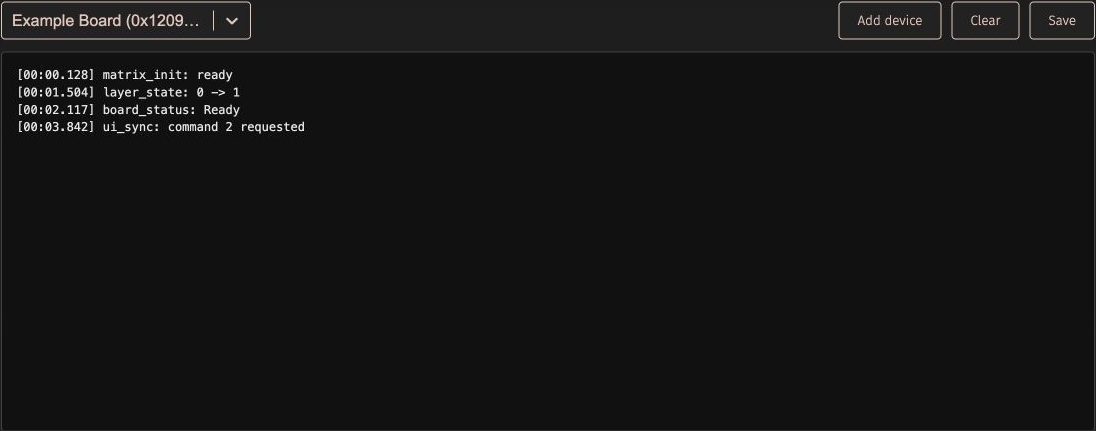
HID Console support
VIA can display output from the standard QMK console HID interface. Enable CONSOLE_ENABLE = yes in the VIA keymap, then enable Show HID Console tab in VIA Settings.
The console follows the selected VIA keyboard when possible, can authorize and select a different console device, keeps separate in-session buffers, and can clear or save timestamped text logs. Because WebHID does not expose a stable serial number, multiple identical devices may be difficult to distinguish.
VIA application changes
Web and desktop applications
The VIA web app is the supported and recommended way to use VIA. It serves the current app and matching definition support together, with no separate compatibility component for users to install or select.
The existing official desktop application is deprecated. It should not be used as the compatibility baseline for new definitions or firmware features. A replacement desktop application is planned for the future, but no release date is currently specified. Until that replacement is available, use the web app for current VIA functionality.
Slider modes
Settings now offers three presentations for range controls:
- Slider Only
- Slider & Show Value
- Slider & Input Field
Numeric input commits on Enter or when focus leaves the field, cancels on Escape, and rejects empty, fractional, or invalid values. Definition authors do not need to change their range controls to support these modes.

Language and host-layout selection
VIA's interface can be displayed in English, Chinese, Korean, Japanese, Spanish, or German. The host keyboard-layout selector also lets VIA render key legends for supported non-US layouts. Multiline legends are detected by their line break rather than by a US-specific symbol list.
Clearer device diagnostics
VIA now distinguishes two common connection failures:
- a WebHID device that does not respond like VIA-compatible firmware
- a VIA-compatible device for which no matching V2 or V3 definition was found
The warning includes the device VID/PID and directs the user to reconnect, install compatible firmware, sideload a manufacturer-provided definition through the Design tab, or contact the keyboard vendor as appropriate.
Custom-value errors also preserve their semantic command names, preventing custom-menu failures from being mislabeled as legacy backlight failures when numeric command IDs overlap.
Fallbacks and validation failures
| Condition | VIA behavior | Author action |
|---|---|---|
| Firmware version cannot be read | id_firmware_version is unavailable, so version-gated UI cannot be selected reliably. | Use current QMK VIA support and define VIA_FIRMWARE_VERSION. Test every supported firmware generation. |
| Dynamic-name command is unsupported, errors, or returns an invalid index | VIA uses the first entry in name.options. | Put the safest general name first and return a zero-based valid index. |
| Keyboard-provided label has no null terminator | VIA decodes all returned bytes. | Null-terminate the UTF-8 text and clear unused response bytes. |
| Keyboard-provided label contains invalid UTF-8 | Invalid sequences are displayed with Unicode replacement characters. | Encode the response as valid UTF-8 and keep it within the Raw HID response capacity. |
| Range constraint references a missing range, reuses an ID with a different command, or describes an impossible relationship | Definition validation rejects the definition. | Give each range a unique key, reference the complete command tuple when needed, and test both boundary values. |
| Firmware ignores extended command arguments | VIA sends the tuple correctly, but the firmware reads or writes the wrong addressed value. | Treat bytes between value_id and the value payload as arguments on both get and set. |
| Synchronization request has an unsupported version/type or targets no active control | VIA ignores the request. | Use request format version 0x01, coalesce requests, and target commands present in the active definition branch. |
qmk_lighting has no recognized built-in lighting menu on protocol 13 | VIA exposes both UG_* and RM_*, but not BL_*. | Replace the fallback with the explicit module combination. |
| Explicit RGB lighting module conflicts with the standardized menu | The definition can load, but the Design tab displays a subsystem-mismatch warning. | Make menus and keycodes describe the same firmware subsystem. |
Migration and validation checklist
Review an older V3 definition or firmware with the following checklist:
- Replace
qmk_lightingwith the matching explicit lighting keycode module when the subsystem is known. - Keep
qmk_lightingonly when compatibility with older definitions is required, and do not combine it with an explicit module. - Use firmware-version
showIfbranches instead of creating another VID/PID solely for added custom controls. - Use a dynamic
nameonly when compatible variants sharing one definition must display different names. - Add range constraints instead of relying on firmware alone to correct invalid paired values after the UI sends them.
- Request a UI refresh when firmware changes a displayed custom value independently.
- Move VIA keymaps from upstream QMK forks to VIA's external QMK userspace contribution flow.
- Move supported keyboard hardware settings from legacy
config.hor keyboard-levelrules.mkentries into QMKinfo.json.
Before submitting a definition:
- Build the VIA keymap from VIA's external QMK userspace and flash the exact artifact being tested.
- Sideload the definition through the Design tab and resolve validation errors and subsystem warnings.
- Confirm the reported VID, PID, VIA protocol, firmware version, and displayed dynamic name.
- Exercise every
showIfbranch with each supported firmware revision; confirm hidden firmware-only branches do not issue custom-value reads. - Read, edit, save, reconnect, and read again for every custom control, including the minimum and maximum of each range.
- Test both sides of every range constraint and both
clampandpushbehavior where used. - Trigger board-initiated changes and confirm targeted and refresh-all synchronization update the UI without reopening the device.
- Verify the lighting keycode picker against the firmware subsystem. When both protocols are supported, test a protocol-12 and protocol-13 build.
- Assign new keycodes, test Any-keycode entry, macros, and encoders, then export and re-import the layout.
- Reconnect with another identical or related device if the definition uses dynamic names or per-device firmware branches.
- Enable HID Console, confirm output follows the selected device, and verify that disabling console support fails cleanly.